Showing posts with label GNU/Linux. Show all posts
Thursday, August 9, 2026
Saturday, August 4, 2026
How to make You-tube videos in Ubuntu
Hey guys
There is a good tool available in Ubuntu, for recording the screen. The main purpose of recording screen is making you-tube videos. The tool is called gtk-recordscreen
You can install it by command line or through synaptic package manager
$sudo apt-get install recordmydesktop
From synaptic package manager
Labels:
GNU/Linux,
Tips and Tricks
Meshlab: A 3D Viewer for Linux
MeshLab is an open source, portable, and extensible system for the processing and editing of unstructured 3D triangular meshes.
The system is aimed to help the processing of the typical not-so-small unstructured models arising in 3D scanning, providing a set of tools for editing, cleaning, healing, inspecting, rendering and converting this kind of meshes.
Website
http://meshlab.sourceforge.net/
Installation in Ubuntu
$sudo apt-get install meshlab
The system is aimed to help the processing of the typical not-so-small unstructured models arising in 3D scanning, providing a set of tools for editing, cleaning, healing, inspecting, rendering and converting this kind of meshes.
Website
http://meshlab.sourceforge.net/
Installation in Ubuntu
$sudo apt-get install meshlab
Labels:
3D Modelling,
GNU/Linux
Tuesday, June 19, 2026
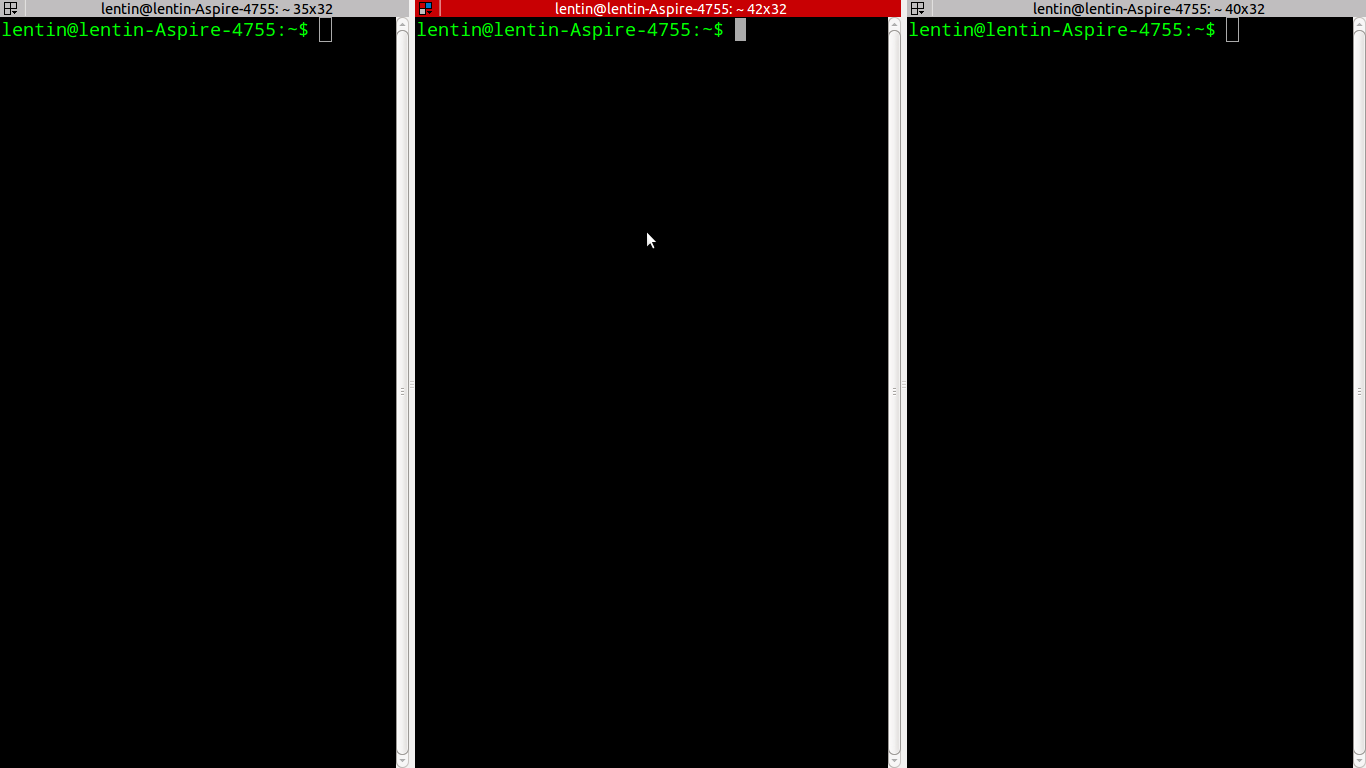
Linux terminal split screen mode
In GNU/Linux ,terminal is a very useful tool for development .We often need multiple window for single application .Default terminal application willnot support split screen.
You have to install Terminator from Ubuntu repo for this
1)$sudo apt-get install terminator
2)Right click on terminal and select split horizontal or vertical
Labels:
GNU/Linux
Sunday, April 22, 2026
Installing Linux Kernel 3.3.2 on Ubuntu 11.04
Hi
I am sharing the link that helped me to do this installation
Labels:
GNU/Linux,
Linux Kernel
Saturday, October 8, 2026
Mouse Controlling in Linux using Laser
Hi all
Here is a code running on Ubuntu Linux which move the mouse cursor using laser point .The main library used for this code is XLib and Open CV.
Code
#define SPACE XK_A
#include<stdio.h>
#include<highgui.h>
#include <X11/Xlib.h>
#include <X11/keysym.h>
#include<string.h>
#include<math.h>
XKeyEvent createKeyEvent(Display *display, Window &win, Window &winRoot, bool press, int keycode, int modifiers)
{
XKeyEvent event;
event.display = display;
event.window = win;
event.root = winRoot;
event.subwindow = None;
event.time = CurrentTime;
event.x = 1;
event.y = 1;
event.x_root = 1;
event.y_root = 1;
event.same_screen = True;
event.keycode = XKeysymToKeycode(display, keycode);
event.state = modifiers;
return event;
}
main()
{
CvCapture* VideoBuffer = cvCaptureFromCAM(CV_CAP_ANY);
uchar *Data;
int revert,Step,noPointerInterval = 0,i,j,k,XCordSum = 0,YCordSum = 0;
int RedPixelCount = 0,hold=0,noPointerFlag=0,blinkInterval=0,Width,Height;
Display *display = XOpenDisplay(0);
XKeyEvent event;
Window winRoot;
winRoot = XDefaultRootWindow(display);
Window winFocus;
char num;
if(!VideoBuffer)
{
printf("NO CAM FOUND!!!\n");
exit(0);
}
while(1)
{
RedPixelCount=0;
XCordSum=0;
YCordSum=0;
IplImage* Frame=cvQueryFrame(VideoBuffer);
Height=Frame->height;
Width=Frame->width;
Step=Frame->widthStep;
Data=(uchar *)Frame->imageData;
for(i=0;i<Height;i++)
for(j=0;j<Width;j++)
{
if((2*Data[i*Step+j*3+2]-Data[i*Step+j*3+1]-Data[i*Step+j*3]>130))
{
XCordSum+=j;
YCordSum+=i;
RedPixelCount++;
}
}
if(RedPixelCount)
{
XWarpPointer(display, None, winRoot, 0, 0, 0, 0,(XCordSum/RedPixelCount)*2,(YCordSum/RedPixelCount)*2);
XGetInputFocus(display, &winFocus, &revert);
if(noPointerInterval<=10 && noPointerFlag!=0)
{
if(blinkInterval<5)
{
blinkInterval=5;
}
else
{
XGetInputFocus(display, &winFocus, &revert);
event = createKeyEvent(display, winFocus, winRoot, true, SPACE, 0);
XSendEvent(event.display, event.window, True, KeyPressMask, (XEvent *)&event);
event = createKeyEvent(display, winFocus, winRoot, false, SPACE, 0);
XSendEvent(event.display, event.window, True, KeyPressMask, (XEvent *)&event);
blinkInterval=0;
}
noPointerFlag=0;
fflush(stdout);
}
blinkInterval++;
hold=0;
noPointerInterval=0;
}
if(noPointerInterval>10 && hold==0)
{
printf("\nNO pointer.");
fflush(stdout);
hold=1;
}
noPointerFlag=1;
}
cvReleaseCapture(&VideoBuffer);
return(0);
}
Compiling Command
g++ `pkg-config opencv --cflags --libs` filename.cpp -o outputname
Execution
$./outputname
Sunday, September 4, 2026
Linux Kernel site hacked!!!
Hi all
I got a news saying that linux kernal main site is hacked by an unknown intruder .
The main server is called "hera" .It contain different kernel version and lots of kernel developers are accessing this site .The intruder cracked the root acess but he couldnot change the source code .
Anyway the kernel code is safe .The kernel code is protected by git repositry .The cracking of git is very difficult .
Monday, August 22, 2026
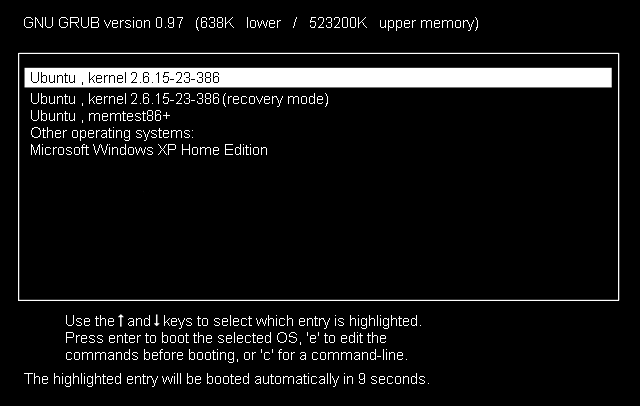
How to Restore Grub in Ubuntu??
Hi all
Grub is a popular boot loader used in Linux distribution like Ubuntu ,Debian ,Mint etc .In some situation ,we have to re-install Grub .The main reason of grub failures are
1)Change in Partition table :Change in partition is happening because of deleting of some partition .In such cases grub failed to find the root partition .So grub shows an error
2)Windows installation : If we install Windows after installing Linux ,then the grub loader will erase from the Master Boot Record .So we have to install grub again .To avoid this situation ,first install Windows ,next install Ubuntu ,then grub will detect the Windows boot loader and show in the grub list
Grub installation Steps
1)If the grub showing error or grub is replaced by Winboot loader then you can do this steps for grub recovery
1)Insert the Ubuntu Live Disc and enter into the live desktop
Note: Insert the same distribution disc that is pre-installed on the system
2)Mount the pre-installed Ubuntu partition by clicking the partition .When we click on the partition ,it will mount in the /media folder .We have to note the name of the mounted partition in the media folder
2)Take terminal from the Accessories menu
3)Enter the following commands below
sudo grub-install --root-directory="/media/<Ubuntu mount name>" /dev/sda
4)Restart the live disc and remove the cd from the drive .
5)When it boot up,we can see the grub .Take Ubuntu from the list and after entering to the desktop
take terminal and type the following command
sudo update-grub
6)Done
Grub is a popular boot loader used in Linux distribution like Ubuntu ,Debian ,Mint etc .In some situation ,we have to re-install Grub .The main reason of grub failures are
1)Change in Partition table :Change in partition is happening because of deleting of some partition .In such cases grub failed to find the root partition .So grub shows an error
2)Windows installation : If we install Windows after installing Linux ,then the grub loader will erase from the Master Boot Record .So we have to install grub again .To avoid this situation ,first install Windows ,next install Ubuntu ,then grub will detect the Windows boot loader and show in the grub list
Grub installation Steps
1)If the grub showing error or grub is replaced by Winboot loader then you can do this steps for grub recovery
1)Insert the Ubuntu Live Disc and enter into the live desktop
Note: Insert the same distribution disc that is pre-installed on the system
2)Mount the pre-installed Ubuntu partition by clicking the partition .When we click on the partition ,it will mount in the /media folder .We have to note the name of the mounted partition in the media folder
2)Take terminal from the Accessories menu
3)Enter the following commands below
sudo grub-install --root-directory="/media/<Ubuntu mount name>" /dev/sda
4)Restart the live disc and remove the cd from the drive .
5)When it boot up,we can see the grub .Take Ubuntu from the list and after entering to the desktop
take terminal and type the following command
sudo update-grub
6)Done
Labels:
GNU/Linux
Wednesday, August 10, 2026
For GNU/Linux Lovers..Watch this video..!!
Hi all
I am sharing a video which deals with the Evolution of Gnu/Linux ....It will be inspiring for all Linux fans..
Revolution of OS
Watch it....
Labels:
GNU/Linux
Subscribe to:
Posts (Atom)